Wednesday, 27 May 2026
  • About us
  • Contact
  • History
  • My Interests
  • Privacy Policy
Nexpressdaily.com
  • Home
  • Politics
  • Finance
  • Health
  • Technology
  • Travel
  • World
  • 🔥
  • Politics
  • Technology
  • Travel
  • World
  • Finance
  • Health
Font ResizerAa
Nexpressdaily.comNexpressdaily.com
  • My Saves
  • My Interests
  • My Feed
  • History
  • Travel
  • Finance
  • Politics
  • Health
  • Technology
  • World
Search
  • Pages
    • Home
    • Blog Index
    • Contact Us
    • Search Page
    • 404 Page
  • Personalized
    • My Feed
    • My Saves
    • My Interests
    • History
  • Categories
    • Finance
    • Politics
    • Technology
    • Travel
    • Health
    • World
Have an existing account? Sign In
Follow US
© 2022 Foxiz News Network. Ruby Design Company. All Rights Reserved.
Technology

Microsoft is now forcing new users to adopt a passwordless future

Nexpressdaily
Last updated: May 2, 2025 2:38 pm
Nexpressdaily
Share
SHARE

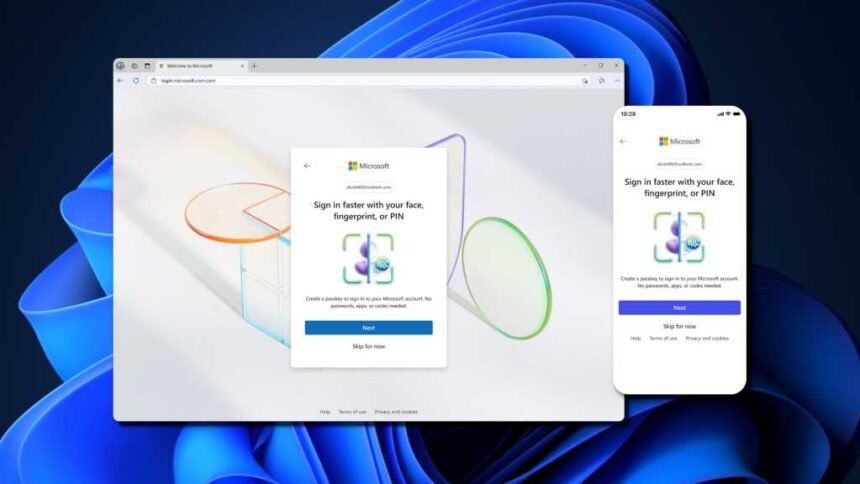
Over the past few years, Microsoft has been moving towards a passwordless future. Back in 2021, they introduced passwordless sign-ins for Microsoft accounts, and earlier this year, they streamlined the Microsoft account sign-in experience with an emphasis on passwordless security via so-called passkeys.

Honestly, it’s a good move. Most passwords are absolutely terrible and offer little defense against hackers. A passkey, on the other hand, is an auto-generated credential that can’t be intercepted or stolen, and you don’t have to memorize anything to use it. It’s quick, easy, and secure, which is why we prefer passkeys over passwords.

Starting May 1st, 2025, anyone who creates a new Microsoft account will default to a login method that doesn’t use passwords. Microsoft made this announcement yesterday for “World Passkey Day,” making it clear that they want to replace passwords with passkeys sooner rather than later. In the blog post, Microsoft writes:

“New accounts are passwordless by default: As part of this simplified UX, we’re changing the default behavior for new accounts. Brand new Microsoft accounts will now be “passwordless by default.” New users will have several passwordless options for signing into their account and they’ll never need to enroll a password. Existing users can visit their account settings to delete their password.”

Existing users can continue to use passwords with their Microsoft accounts, although Microsoft repeatedly points to passkeys as a more secure alternative. They even optimized the login screen for passkeys! But the company won’t force users to switch to passkeys… yet. In the same post, Microsoft also writes:

“Passwordless-preferred sign-in: We’re also making it simpler to sign in with safer options. Instead of showing you all the possible ways for you to sign in, we automatically detect the best available method on your account and set that as the default. For example, if you have a password and “one time code” set up on your account, we’ll prompt you to sign in with your one time code instead of your password. After you’re signed in, you’ll be prompted to enroll a passkey. Then the next time you sign in, you’ll be prompted to sign in with your passkey. This simplified experience gets you signed in faster and in our experiments has reduced password use by over 20%. As more people enroll passkeys, the number of password authentications will continue to decline until we can eventually remove password support altogether.”

In other words, Microsoft will continue to nudge users towards passkeys with the eventual goal of doing away with passwords.

If you’re confused or skeptical or hesitant about passkeys, we don’t blame you. But really, it’s easier and more convenient than you think—and once you create your first passkey, we’re confident you’ll agree. Check out our article on easy ways to start using passkeys right now.

This article originally appeared on our sister publication PC-WELT and was translated and localized from German.

Share This Article
Email Copy Link Print
Previous Article Halifax hospitals face backlash from staff over parking woes
Next Article The Most Important Ingredient in Chewing Gum

Your Trusted Source for Accurate and Timely Updates!

Our commitment to accuracy, impartiality, and delivering breaking news as it happens has earned us the trust of a vast audience. Stay ahead with real-time updates on the latest events, trends.
FacebookLike
XFollow
InstagramFollow
LinkedInFollow
MediumFollow
QuoraFollow
- Advertisement -
Ad imageAd image

Popular Posts

Investors think the Russia-Ukraine war will end soon

War and peace are notoriously difficult to price. Just now they are even harder to…

By Nexpressdaily

Nvidia and AMD to pay 15% of China chip sale revenues to US government

Unlock the White House Watch newsletter for freeYour guide to what Trump’s second term means…

By Nexpressdaily

‘A Beautiful Boost’: Lake Tahoe Reps Are Thrilled by Apple’s Reported New Mac OS Name

Apple's next Mac operating system is called macOS Tahoe, for Lake Tahoe, according to Bloomberg's Mark…

By Nexpressdaily

You Might Also Like

Technology

Google’s AI can now make phone calls for you

By Nexpressdaily
Technology

Zotac’s Zone gaming handheld switched from Windows to Linux

By Nexpressdaily
Technology

T-Mobile and Starlink’s $10 a Month Satellite Texting Service Is Live. Here’s How It Works

By Nexpressdaily
Technology

Taria & Como and Black Hole Havoc

By Nexpressdaily
Nexpressdaily.com
Facebook Twitter Youtube Rss Medium

About US

NexpressDaily.com is a leading digital news platform committed to delivering timely, accurate, and unbiased news from around the world. From politics and business to technology, sports, health, and entertainment – we cover the stories that matter most. Stay connected with real-time updates, expert insights, and trusted journalism, all in one place.

Top Categories
  • World
  • Finance
  • Politics
  • Tech
  • Health
  • Travel
Usefull Links
  • About us
  • Contact
  • History
  • My Interests
  • Privacy Policy

© Nexpressdaily. All Rights Reserved.

Welcome Back!

Sign in to your account

Username or Email Address
Password

Lost your password?