When I first learned Photoshop in the early 2000s, I spent a lot of time making desktop wallpapers. I played with filters and custom brushes, Matrix fonts, and inverted colors. You can probably still find my old “portfolio” of them online somewhere. I don’t have time for that anymore, but I do still use a PC wallpaper app. Weird, right?
Here’s the thing: I don’t want fancy or advanced wallpapers. I don’t want them to be “dynamic” or “live,” I don’t want games tucked in the corner, and I don’t want live news or stock ticker details. (As you can tell, I’m not a fan of Windows widgets and notifications, either.)
I just want my wallpapers to be simple yet varied. I want my Windows background to be fresh while my desktop icons remain legible. But because the built-in Windows Spotlight feature doesn’t offer much customization, I prefer to use the Dynamic Theme app instead—and in my humble opinion, it trumps all the premium alternatives.
Why Dynamic Theme beats Spotlight
Dynamic Theme is a freely available dynamic background tool available in the Microsoft Store (rest assured it works well with all recent versions of Windows) that augments the already-pretty-good Windows Spotlight. It’s been around since the Windows 10 days, so I’m not breaking new ground here, but it really is a diamond in the rough. It does everything I need a wallpaper app to do and more, plus it doesn’t cost a thing.
To be fair, I love how Windows Spotlight gives you a new wallpaper every day, and my curiosities are satisfied by the fact I can click on a little info-bubble and get more information about the landscape, building, or vista in the day’s image. But Windows Spotlight is limited to 1080p and you can’t customize it beyond turning it on and off.
Jon Martindale / Foundry
Dynamic Theme takes all the things I like about Windows Spotlight and adds in the customization that’s missing.
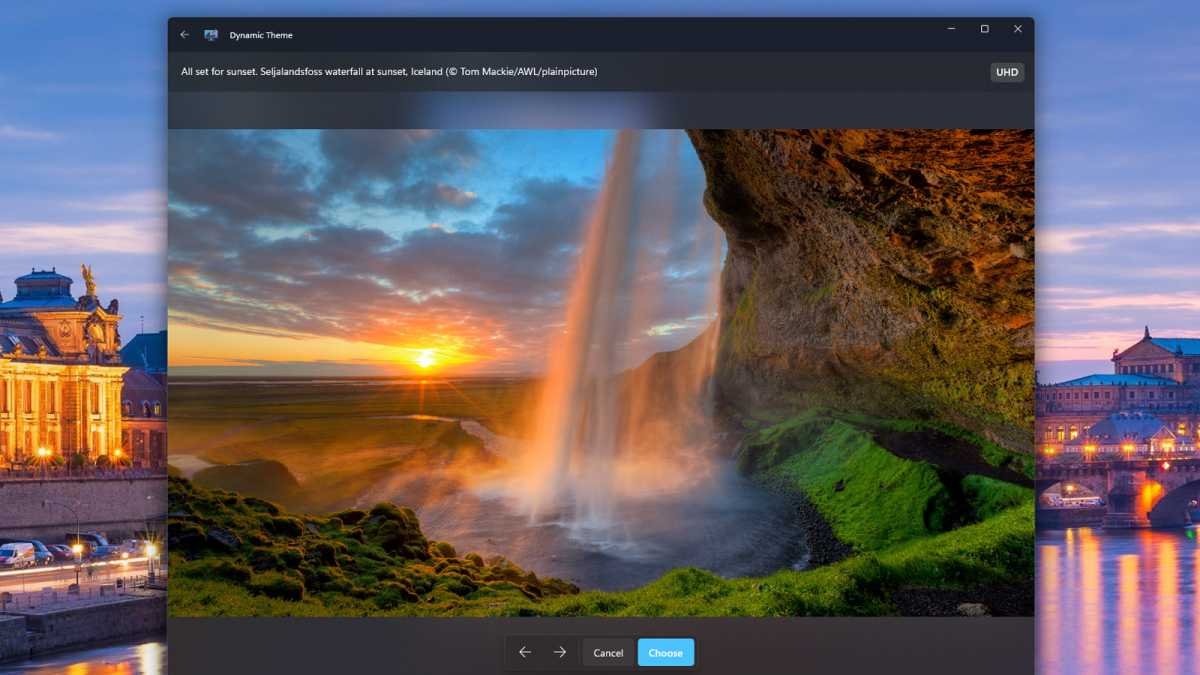
With an interface and theme that looks like a native Windows app, Dynamic Theme feels familiar and has a near-zero learning curve. Yet it gives you the ability to customize how your dynamically altered wallpapers change, including what they change to.
You can choose between Windows Spotlight or Bing as sources for your background pictures (the latter of which can be higher resolutions), and you can choose which image is displayed, too, with the ability to cycle through all recent options and pick the one you like the best.

Jon Martindale / Foundry
You can have a different image for your desktop background versus your lock screen, choose how the background fits to your screen (useful if you have a monitor with a niche aspect ratio), and tweak the behavior of how the background image actually changes.
You can have the changes happen dynamically, send you a notification when a new one is available, or have it trigger at a certain time of day. You can even have the pictures automatically saved offline so you can go back to them later or use them for something else entirely.
Ditching the ads and the tracking
One of the most lip-curlingly distasteful aspects of Windows Spotlight is that, alongside these gorgeous vistas and click-through insights into what or where I’m looking at, Microsoft also inserts ads for various apps and services into them. The little pop-up bubbles aren’t super distracting, but they’re definitely there—and they take away from the beauty of the backdrop and feel intrusive in an exploitative way.
Dynamic Theme does away with all of that. Since it isn’t using Spotlight to change the wallpaper or lock screen background—just grabbing the images and changing it itself—there are no ads to be seen.

Jon Martindale / Foundry
However, Dynamic Theme does have one distasteful setting of its own. Fortunately, it’s a toggle and totally optional.
Once you’ve downloaded the app and set it up as you like, make sure to navigate to the Information tab in the left-hand menu. Alongside some other useful options—like setting the app’s theme and having quick access to a feedback form—is the heading Diagnostic and usage data.
This is the data collection portion of the app that can collect usage and diagnostic information on you and your machine. Ostensibly, it’s to help fix problems when they occur as well as improve the app’s overall service. But if the app is free, you’re the product. And if that bothers you, it’s great to see that there’s a toggle to Disable this data tracking.
Straightforward, simple, and sublime
The modern world of computing, from the internet we browse to the apps we use to the hardware that runs it all, so often feels bloated, oversold, and aggressively complicated. For that reason, it’s always a treat to find an application that’s so definitively simple.
Dynamic Theme gives you the kind of control that Windows Spotlight should have, while ditching the worst aspects of it. It has a clean, straightforward UI that fits in with your Windows theme of choice and doesn’t take any time to learn to navigate.
It lets you prioritize backgrounds that fit your displays and resolutions, leaning into gorgeous views of our world without messing around with resource-draining dynamic or live backgrounds which are more distracting than anything else.
Jon Martindale / Foundry
Dynamic Theme is unashamably old-school in its approach, and it’s exactly the kind of straight-thinking take that I want in something as fundamental to the Windows experience as an attractive, useful wallpaper that makes sure I can see my icons but remains fresh and dynamic.
It changes when I want, how I want, and in a manner that doesn’t overstep its bounds. There’s no paid premium version and no ads. Just gorgeous pictures for my background and lock screen. I don’t have to scroll through a wallpaper site, find the right resolution or aspect ratio, or have my GPU working hard just to display the backdrop.
Sometimes the best tools aren’t the latest and greatest. They’re the ones that continue doing the same great job they’ve always done. Dynamic Theme is one of them. Long may it continue.
Further reading: Useful hidden gem Windows apps worth using