Artificial intelligence software has given editing tools a huge boost in power, far beyond the spell-checkers and grammar aids of yore.
A.I. can proofread, rewrite, summarize and compose text, making it simple to craft clean, complex documents in a flash — even on a smartphone. If you haven’t dabbled yet, free offerings from Apple and Google are an easy place to begin experimenting.
Tinkering with the software lets you see its capabilities and gives you insight on when — and when not — to let A.I. do the writing. Here’s a guide to getting started.
Using Apple Intelligence
Apple’s integrated suite of A.I. tools, called Apple Intelligence, includes a selection of Writing Tools. (It requires iOS 18.1 and a more recent iPhone or iPad.)
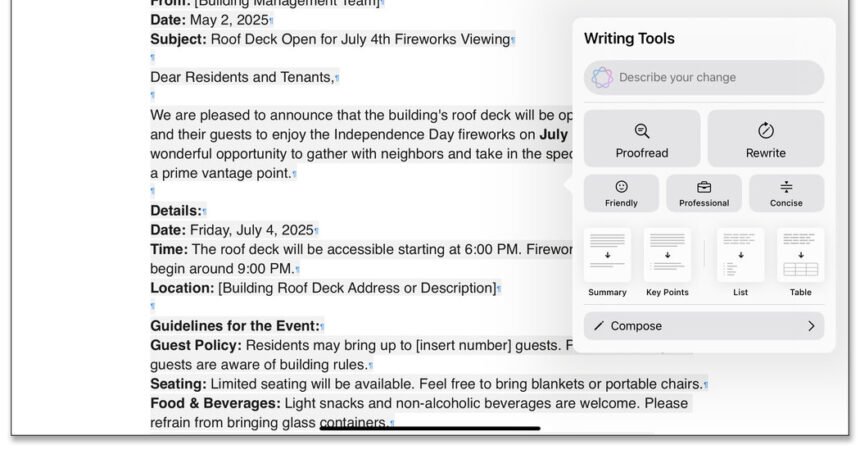
The Writing Tools work in most apps where you type or dictate words. Once you have written something (like in Pages), highlight the section you want to edit. Select Writing Tools in the pop-up menu, or tap the circular Apple Intelligence icon in the toolbar.
In the Writing Tools menu, select the option you want to use, like Proofread, Rewrite or Summarize — or describe how you want to change the text. You can display it as key points, a list or a table, or even recast the tone of the writing with a tap to make it sound friendlier, more professional or streamlined. If you don’t like the changes, revert to the original.
With the help of the popular ChatGPT chatbot, Apple Intelligence can compose a draft from scratch, although you need to enable ChatGPT first. To do so, tap the Compose button and follow the onscreen directions. (The New York Times has sued ChatGPT maker OpenAI and its partner, Microsoft, claiming copyright infringement of news content related to A.I. systems. The two companies have denied the suit’s claims.)
Like other A.I. chatbots, Gemini responds to questions and prompts. For example, you could paste in a memo draft and ask Gemini to proofread and fact-check it for you.
Gemini can also generate text upon request, like a project proposal. For example, in the prompt box, enter “Help me draft a proposal to the City Council to get a permit for a Dog Days of Summer festival on Aug. 2 and 3 that features a puppy parade, a Wiener Dog Derby, a fetch competition and vendor booths for local pet stores.”
Once Gemini cranks out the proposal draft, you can save it as a Google Doc for your own editing and refinement.
Using Other Options
If your device is too old for Apple Intelligence or you don’t use Google products, you still have plenty of A.I. helpers to consider, although many charge a subscription fee. Grammarly has been around since 2009 and now has a mobile app that works with your device’s keyboard software for proofreading, tone adjustments and other A.I. assistance. Microsoft has its Copilot A.I. tool that works with the Microsoft 365 suite.
The app stores have many A.I. bots, including writing-specific assistants like ParagraphAI for a variety of communications styles (including help for dyslexic writers) and Sudowrite for narrative projects. General chatbots like ChatGPT (which has a writing assistant) or Anthropic’s Claude can rewrite or generate text.
Keep in Mind
Remember that A.I. is not perfect. Check the bot’s work because it can make mistakes.
And while A.I. assistance has numerous advantages for more impersonal documents like memos and proposals, relying on it too much can dilute your voice and style — especially as more people use A.I. to write.
Take the first sentences of Arthur Conan Doyle’s 1891 short story “A Scandal in Bohemia,” as rewritten by software to make Dr. Watson sound more casual:
Original: To Sherlock Holmes she is always the woman. I have seldom heard him mention her under any other name. In his eyes she eclipses and predominates the whole of her sex. It was not that he felt any emotion akin to love for Irene Adler.
Apple Intelligence: Sherlock Holmes always referred to her as the woman. He rarely used any other name for her. In his mind, she was the most prominent woman among all women. It wasn’t because he felt any romantic feelings for Irene Adler.
Gemini: For Sherlock, she’s always just ‘the woman.’ I’ve hardly ever heard him call her anything else. The way he sees it, she totally outshines all other women. It’s not like he was in love with Irene Adler or anything.
You should always be in command of your own words — which might help prevent people from thinking, “Hey, did A.I. write this?”